Table of Contents
- Why Speed Matters in Field Inspection Logging
- Step 1: Choose the Right Mobile Inspection App for Field Workers
- Step 2: Set Up Customizable Inspection Checklists
- Step 3: Use Voice-to-Text for Faster Annotations
- Best Practices for Site Documentation That Saves Time
- How to Reduce Inspection Reporting Time Through Automation
- Common Mistakes That Slow Down Inspection Logging
- Fastest Way to Log Inspections: Your Action Plan
Last Updated: August 29, 2026
Why Speed Matters in Field Inspection Logging
Field inspectors face a persistent bottleneck: the gap between capturing visual data on-site and delivering a professional, searchable report. A single site visit generates 200-300 photos, but without a system to organize them instantly, you’re left with unnamed images and scattered notes (peer-reviewed research). Most inspectors use general photography tools, then manually type descriptions, search through folders, and rebuild reports from scratch for each client.
Mobile inspection apps designed for field workers change this entirely. By automating geotagging, timestamping, and photo annotation, these tools transform your Android device into a professional documentation system. PhotoLog lets you capture images with automatic GPS coordinates and timestamps, then add voice or typed notes that make every photo instantly searchable by keyword or date. What used to take hours of post-site work now takes minutes.
This guide covers the fastest way to log inspections by focusing on methods and tools that compress the timeline. You’ll learn how to set up mobile workflows that capture data correctly the first time, reduce manual data entry, and generate formatted reports without extra steps.
Step 1: Choose the Right Mobile Inspection App for Field Workers
The fastest way to log inspections starts with selecting a tool built for the actual work. A mobile inspection app should handle the full workflow: capture, organize, annotate, and export. If you’re jumping between the phone’s native camera, a notes app, and a separate reporting tool, you’re already slow.
Key features that accelerate logging
The best mobile inspection apps share non-negotiable features. First, offline functionality. Most construction sites and remote infrastructure projects have spotty or no cell service (fcc.gov). If your app requires internet to save photos or notes, you’ll lose data or be forced to wait until you’re back at the office to document what you saw. A truly fast system works offline and syncs automatically when connectivity returns.
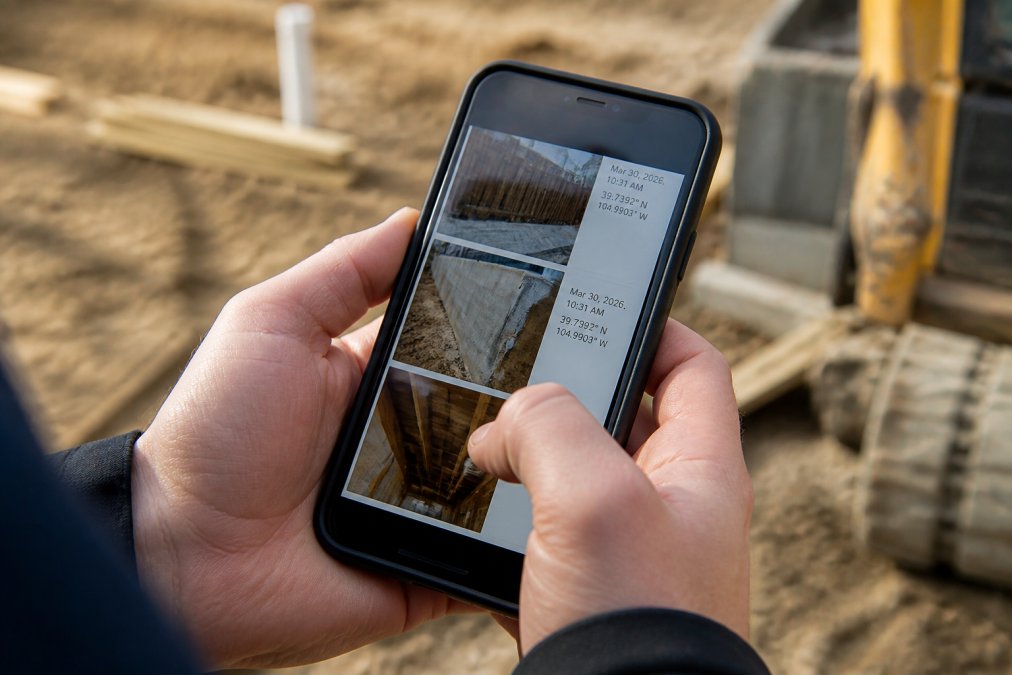
Second, automatic metadata. Manual geotagging and timestamping add minutes to every photo. The app should attach GPS coordinates and exact date/time without user input, creating an audit trail and making photos searchable by location and date later.
Third, voice-to-text annotation. Typing notes on a phone while wearing gloves, in harsh sunlight, or climbing a ladder is slow and error-prone. Voice dictation lets inspectors describe what they’re seeing in real time. PhotoLog’s voice annotation feature captures spoken notes and attaches them to the image, making the photo instantly searchable by the words you spoke.
Fourth, searchable photo organization. Session-based organization by project or date, combined with full-text search across typed and voice notes, means you can locate any photo in seconds instead of scrolling through hundreds of unnamed images.
Offline-first capability for remote sites
Offline-first design is the difference between a tool that works in the field and one that only works in the office. When documenting a remote environmental survey or construction site without reliable connectivity, an app that requires constant internet becomes a liability. You’ll either lose photos, be unable to add notes, or waste time waiting for uploads.
PhotoLog’s offline-first architecture saves every photo, annotation, and metadata locally on your Android device immediately. Once you regain connectivity, the app automatically syncs all data. This eliminates the anxiety of losing documentation and removes the need to remember what you photographed hours later.

Step 2: Set Up Customizable Inspection Checklists
A blank canvas is slow. A customized checklist is fast. Before you start logging inspections, define exactly what you’re inspecting and build a template that matches your workflow. This eliminates decision-making on-site and ensures consistency across inspectors and projects.
Build templates once and reuse them. A structural engineer inspecting a building foundation needs different checkpoints than an environmental consultant surveying soil contamination. Include the specific defects, conditions, or measurements you need to document, and assign each checklist item a category or severity level so you can filter results later.
Customizable checklists reduce cognitive load. Instead of an inspector thinking "What should I document here?", they follow a structured path through the site. This speeds up the inspection itself and ensures no critical areas are missed. When you export the final report, a well-designed checklist translates directly into a professional-looking document with no reorganization needed.
Build lean checklists that your team can complete in the field without feeling like they’re filling out a compliance form. The goal isn’t to document everything; it’s to document what matters for your specific use case.
Step 3: Use Voice-to-Text for Faster Annotations
Voice-to-text annotation is the single fastest way to add detailed notes to photos without slowing down on-site work. Typing on a phone requires both hands, good visibility, and a stable surface. Speaking takes seconds and captures more nuance than typed notes.
When you photograph a defect or condition, dictate what you’re seeing immediately. Describe the location, severity, cause, and action needed. The app captures your words and attaches them to the image, making that photo searchable by any word you spoke. Later, when searching for all photos related to "electrical hazard," you’ll find them instantly.
PhotoLog’s voice annotation feature converts speech to text in real time, so you see what the app captured before moving to the next photo. This is faster than typing and more reliable than trying to remember what you documented hours later.
Reserve voice annotation for conditions that need explanation: why something failed, what the consequence is, or what remediation looks like. Quick visual documentation doesn’t need a voice note.
Best Practices for Site Documentation That Saves Time
The fastest way to log inspections relies on standardized practices that your entire team follows. When every inspector documents the same way, reports are consistent, searchable, and professional.
Standardize your inspection templates
Build a single template for each type of inspection your organization performs. A construction site inspection template should include sections for structural integrity, safety hazards, material quality, and schedule adherence. An environmental survey template might cover soil conditions, water quality, vegetation, and contamination indicators.
Once the template is built, every inspector uses it. This creates consistency across projects and makes it easy to compare results. Standardized templates also reduce mental overhead on-site, an inspector doesn’t have to decide what to photograph or how to organize notes.
Use automatic geotagging and timestamping
Every photo should automatically include GPS coordinates and exact date and time. This proves when and where the inspection occurred, creates a timeline of site progress, and makes photos searchable by location and date.
PhotoLog automatically attaches GPS data to every image, so you never have to manually enter coordinates or worry about forgetting location information. The timestamp creates an audit trail critical for regulatory compliance in industries like environmental consulting and infrastructure management (the EPA).
PhotoLog allows you to toggle GPS tagging on or off for sensitive sites or when clients request it, maintaining documentation accuracy without compromising security.
How to Reduce Inspection Reporting Time Through Automation
The gap between completing an inspection and delivering a report is where most teams lose time. Manual report building, copying photos into a template, retyping notes, and formatting for client delivery can take hours for a single site visit. Automation compresses this to minutes.
Real-time data synchronization and batch processing
The fastest way to log inspections includes real-time synchronization of data from your field device to a cloud-based system. As soon as you regain connectivity after a site visit, all photos, notes, and metadata sync automatically. You don’t have to manually upload files or worry about losing data.
Batch processing lets you organize multiple inspections at once. If you conducted five site visits in a day, you can process all five simultaneously, tagging them by project, filtering by severity, or grouping by location.
Automated field reports with photo attachments
Professional field reports should be generated automatically from your inspection data, not assembled manually. PhotoLog’s built-in Field Report feature generates structured reports directly from your inspection session. The report includes all photos in sequence with your voice and typed notes attached to each image, timestamps and GPS coordinates embedded, and automatic formatting that looks professional without extra work.
This eliminates the step where an inspector spends hours reorganizing photos, retyping notes into a document, and formatting everything for client delivery. The report is ready to export and share immediately after the inspection ends.
Common Mistakes That Slow Down Inspection Logging
The first mistake is using generic tools instead of purpose-built mobile inspection apps. A standard phone camera plus a notes app feels free, but it costs time through manual organization, retyping, and report rebuilding.
The second mistake is inconsistent documentation practices. When each inspector uses their own system, reports become hard to standardize and compare. Consistency is speed.
The third mistake is failing to use voice annotation. Inspectors who insist on typing every note work slower than necessary. Voice-to-text is faster, captures more detail, and doesn’t require both hands or a stable surface.
The fourth mistake is not working offline. Inspectors who wait for connectivity to save photos or upload data lose time and risk losing documentation.
The fifth mistake is ignoring searchability. If your photos are organized by date but you need to find all electrical hazards, you’ll manually scroll through every image. A system where photos are searchable by voice-annotated keywords saves enormous amounts of time.
Fastest Way to Log Inspections: Your Action Plan
Start implementing the fastest way to log inspections in three phases.
Phase 1: Select and Set Up Your Tool. Choose a mobile inspection app built for your specific use case. PhotoLog’s offline-first design and automatic geotagging make it ideal for construction inspections, environmental surveys, and infrastructure audits. Download the app, create your first inspection session, and test offline functionality.
Phase 2: Build Your Templates. Define the checkpoints and categories specific to your inspections. Create a checklist template that your team will use for every inspection of that type. Test the template on a low-stakes site visit to refine it before rolling it out across your team.
Phase 3: Train Your Team and Measure. Show inspectors how to use voice annotation, how to work offline, and how to generate reports. Track the time it takes to complete an inspection and produce a report. Most teams see a reduction in post-site documentation time within the first two weeks.
The fastest way to log inspections is a system that eliminates friction at every step. From offline capture to automated reporting, each component compounds to create a workflow dramatically faster than manual alternatives.
Speed in field inspection logging comes down to eliminating manual steps that don’t add value. PhotoLog transforms your Android device into a professional field documentation system with automatic geotagging, voice-to-text annotation, and instant report generation. Instead of spending hours organizing photos and retyping notes after every site visit, you capture everything correctly on-site and export a finished report in minutes. Download PhotoLog free and experience how the fastest way to log inspections actually works in practice.
Frequently Asked Questions
Q: How much time can I actually save by switching to a mobile inspection app?
A: Time savings depend on your current workflow and inspection volume. Field workers typically spend a significant portion of their day on manual data entry and report assembly. Mobile apps with voice-to-text, automatic geotagging, and pre-built checklists eliminate redundant typing and field-to-office data transfer. The fastest way to log inspections combines offline capability (no connectivity delays), voice notes, and automated report generation. Measurable savings can appear within the first two weeks as your team adapts to the faster logging process.
Q: Will a mobile inspection app work offline on remote job sites?
A: Yes, offline-first functionality is essential for field work. The fastest mobile inspection apps for field workers store data locally on your Android device and synchronize automatically when connectivity returns. This eliminates waiting for uploads, losing signal, or losing data. Geotagging, timestamping, and photo attachment all function offline. Once you return to an area with cell service or WiFi, real-time synchronization uploads everything to the cloud. This approach is critical for environmental surveys, remote infrastructure inspections, and construction sites with spotty connectivity.
Q: How accurate is GPS geotagging for compliance documentation?
A: Modern mobile devices use GPS, Wi-Fi triangulation, and cellular signals for location data. Accuracy typically ranges from 5-15 meters in open areas and can be less precise in dense urban environments or indoors. For compliance documentation, geotagging creates an audit trail showing exactly where and when each photo was taken. This satisfies regulatory standards requiring time and location-stamped evidence. Always verify geotagging is enabled before relying on it for official reports, especially for environmental surveys where precise coordinates are critical.
Q: Can I export inspection data and reports easily for client delivery?
A: Yes, the fastest mobile inspection apps generate formatted field reports with all photos, notes, and metadata organized professionally. Most tools export as ZIP files or PDF reports ready for client sharing. You can attach reports to emails or share via any standard phone app without manual reorganization. This eliminates hours spent sorting photos, writing descriptions, and formatting documents. Searchability by event key or date means finding specific inspections takes seconds instead of scrolling through hundreds of photos.
This article was written using GrandRanker